Categories
Uncategorized

Negative emissions purchase from Vesta project

We believe that everyone has to do their part. So we are using this Nissan Leaf for on site projects when public transport is not feasible.

We are happy to announce that today following the lead of stripe we have purchased negative emissions from Vesta project that will also help them move forward with their pilot project. We are looking forward to making a positive impact both both providing IT support in Japan as well as making the world a better place for future generations.


Categories
Uncategorized

Mount Fuji from Shinagawa Tokyo

Working on a S&P500 customer for a multi-year IT project in Shinagawa.

Tonight great views of Mt Fuji from the elevator after a well done job.

Categories
Uncategorized

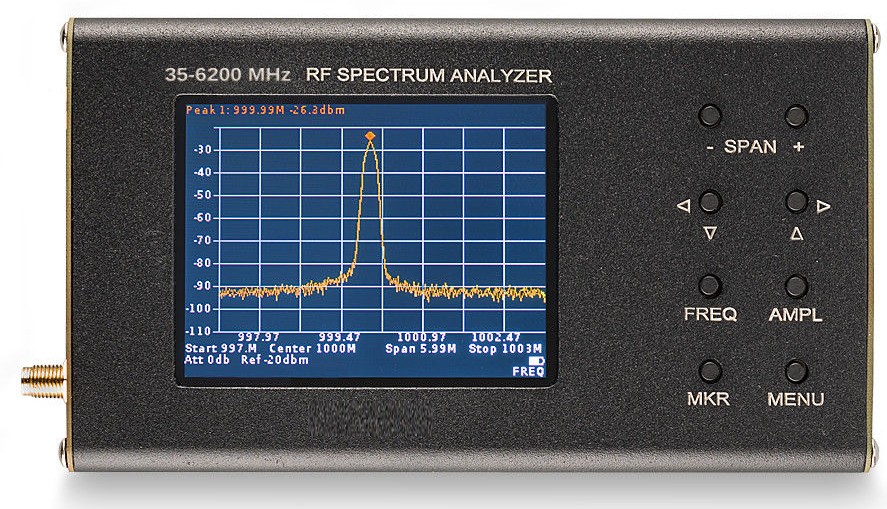
Spectrum Analyzer for LoreaTec Japan

We have acquired this spectrum analyzer to help customers in Japan understand their wifi and other frequency signals as well as analyze amplitude, interference, etc. It is possible to generate data files to be viewed on customer’s PC.

Do not hesitate to contact us if you need spectrum analyzer service for your offices in Tokyo or anywhere else in Japan. If you need to analyze a wireless device, you can also post it to our offices for in house analysis.


Categories
Uncategorized

Eco car for loreatec on site PC support.

We are very excited to announce that LoreaTec has purchased this Coulis Red 100% electric 2018 Nissan Leaf to make good on our commitments to run stop using fossil fuels and run all operations on 100% renewable energy.

This car will be used for on site support services in Tokyo and Saitama for areas where  public transport is not an option.

Categories
Uncategorized

Ubuntu 16.04 LTS network / wifi disconnecting after a few minutes

There are many people having network and wifi issues after upgrading to ubuntu 16.04.

A common problem is that wifi or network stays connected but the browser (firefox, chrome, opera) shows page not found or a similar error after a couple of minutes. Clicking on the network icon and reconnecting usually fixes this but it happens again after one or two minutes.

It seems that there is a bug and IPv6 is creating this issue the solution is to disable IPv6 on your connetion. Most home and business LANs are not using IPv6 so this should be safe.

To disable IPv6 click on the network icon, click on edit conections, choose the connection you are using and click on edit, on the IPv6 tab method dropdown menu choose IGNORE.

This has helped many of our customers. I hope it helps our blog readers too.